QR Decode API
Decode supported merchant QR codes to extract payment information for seamless transactions.
Decode QR Code
Extract payment information from a supported merchant QR payload.
POST /business/decode-qrRequest Body
| Field | Type | Required | Description |
|---|---|---|---|
qrString | string | Yes | QR code data string |
country | string | No | Optional two-letter country hint, such as UG |
countryCode | string | No | Optional alias for country; provide one country hint at most |
Supported QR Formats
- EMV Standard: Lipa na M-Pesa (Kenya)
- TIPS: Tanzania Instant Payment System
- TANQR: Tanzania QR Code Standard
- MTN MoMo Pay: Uganda merchant QR payloads
EMV, TIPS, and TANQR payloads follow merchant-presented QR standards. Uganda MTN MoMo Pay QR codes use a provider-specific merchant payload and should include the UG country hint when decoding.
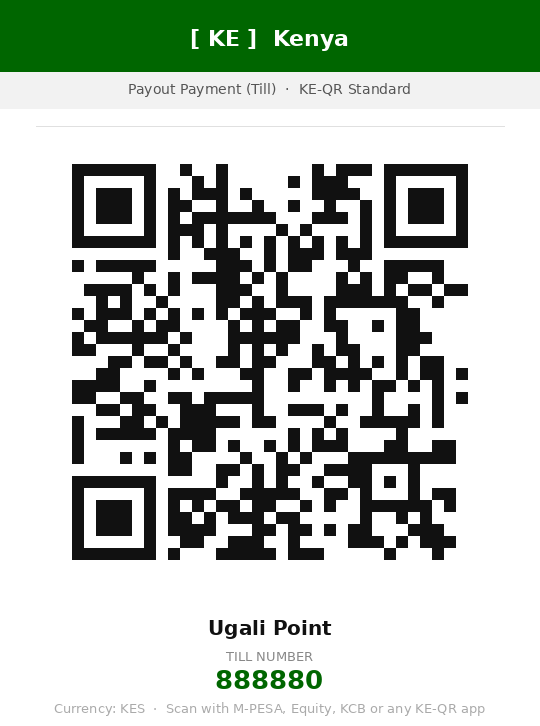
Scan with your phone camera, copy the decoded string, and POST it to /business/decode-qr.



Example Request - Kenya EMV QR
curl -X POST https://api.test.wakapay.io/business/decode-qr \
  -H "Authorization: Bearer YOUR_ACCESS_TOKEN" \
  -H "Content-Type: application/json" \
  -d '{
    "qrString": "00020101021128370008ke.go.qr010801888880020504000053031045802KE5912KPLC PREPAID6006KITALE62470114KE123456789012280703LPMN0315017123456789012341630444F1"
  }'
const response = await fetch("https://api.test.wakapay.io/business/decode-qr", {
method: "POST",
headers: {
Authorization: `Bearer ${accessToken}`,
"Content-Type": "application/json",
},
body: JSON.stringify({
qrString:
"00020101021128370008ke.go.qr010801888880020504000053031045802KE5912KPLC PREPAID6006KITALE62470114KE123456789012280703LPMN0315017123456789012341630444F1",
}),
})
const data = await response.json()
console.log(data)Response
{
  "amount": null,
  "channel": "Safaricom",
  "countryCode": "KE",
  "currency": "KES",
  "isStatic": true,
  "merchantCity": "KITALE",
  "merchantName": "KPLC PREPAID",
  "tillNumber": "01888880"
}
Example Request - Tanzania TIPS QR
curl -X POST https://api.test.wakapay.io/business/decode-qr \
  -H "Authorization: Bearer YOUR_ACCESS_TOKEN" \
  -H "Content-Type: application/json" \
  -d '{
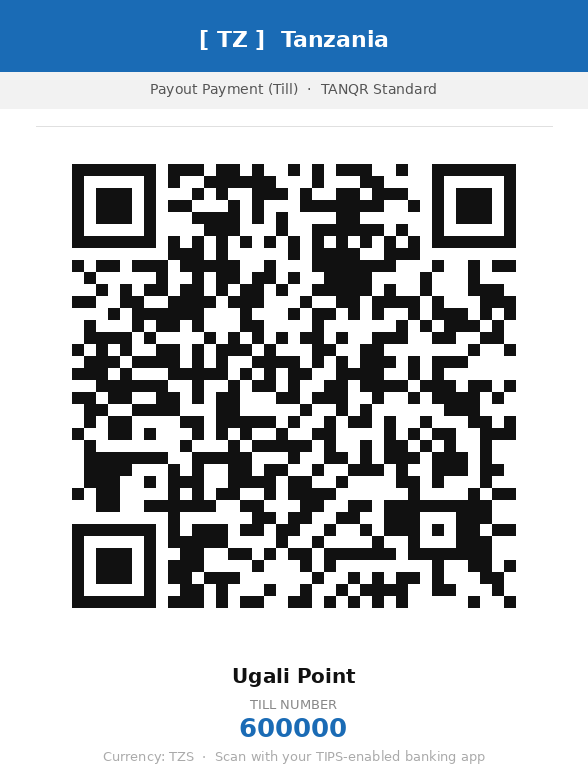
    "qrString": "00020101021126420014tz.go.bot.tips0110000000000102066000005204000053038345802TZ5911UGALI POINT6013DAR ES SALAAM610511000630414DA"
  }'
{
"amount": null,
"channel": "TIPS",
"countryCode": "TZ",
"currency": "TZS",
"isStatic": true,
"merchantCity": "DAR ES SALAAM",
"merchantName": "UGALI POINT",
"tillNumber": "600000"
}Example Request - Uganda MTN MoMo Pay QR
Use the country hint for Uganda’s provider-specific MoMo Pay payload.
curl -X POST https://api.test.wakapay.io/business/decode-qr \
  -H "Authorization: Bearer YOUR_ACCESS_TOKEN" \
  -H "Content-Type: application/json" \
  -d '{
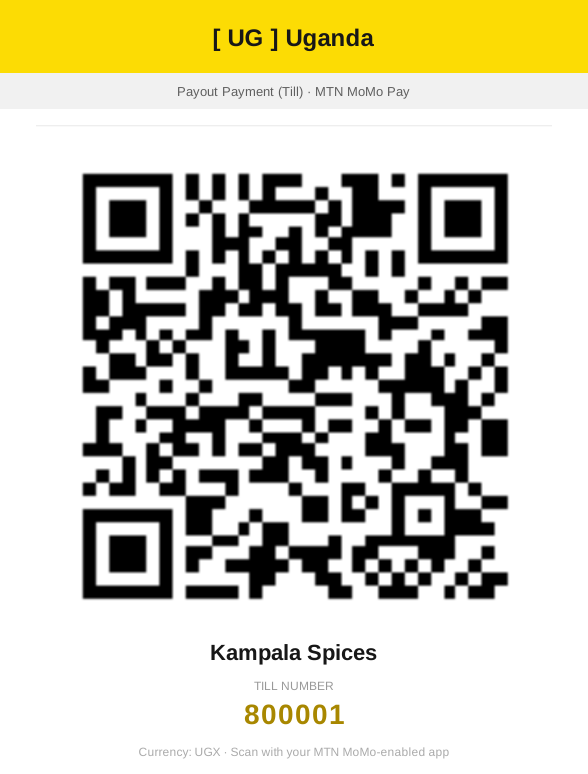
    "qrString": "800001@momopay:undefined:undefined:256700000001:Kampala Spices",
    "country": "UG"
  }'
{
"countryCode": "UG",
"currency": "UGX",
"merchantName": "Kampala Spices",
"channel": "MTN",
"tillNumber": "800001",
"merchantMobile": "+256700000001",
"amount": null
}Response Fields
| Field | Type | Description |
|---|---|---|
amount | number or null | Amount (null for static QR, value for dynamic QR) |
channel | string | Payment network, such as Safaricom, TIPS, or MTN |
countryCode | string | Two-letter country code |
currency | string | Currency code |
isStatic | boolean | true for static QR; false for dynamic QR with a fixed amount |
merchantCity | string | Merchant city extracted from the QR |
merchantMobile | string | Merchant phone number when present in the provider payload |
merchantName | string | Merchant name extracted from the QR |
tillNumber | string | Till or merchant number extracted from the QR |
QR Code Types
Static QR Codes
Static QR codes don’t have a pre-filled amount. Customers enter the amount at payment time.
{
  "amount": null,
  "isStatic": true,
  "tillNumber": "01888880"
}
Use case: Till numbers, merchant terminals where amounts vary per transaction.
Dynamic QR Codes
Dynamic QR codes contain a specific amount to be paid.
{
  "amount": 1500,
  "isStatic": false,
  "tillNumber": "01888880"
}
Use case: Invoices, bills, fixed-price items.
EMV QR Code Format
The test QR code decodes as follows:
QR String:
00020101021128370008ke.go.qr010801888880020504000053031045802KE5912KPLC PREPAID6006KITALE62470114KE123456789012280703LPMN0315017123456789012341630444F1Breakdown:
00020101- Payload format indicator (EMV version)0211- Point of initiation method2837...- Merchant account information (contains till number)5802KE- Country code (Kenya)5912KPLC PREPAID- Merchant name6006KITALE- Merchant city
Use Cases
Decode and Display Information
async function decodeAndDisplayQR(qrCodeData) {
  const response = await fetch(
    "https://api.test.wakapay.io/business/decode-qr",
    {
      method: "POST",
      headers: {
        Authorization: `Bearer ${token}`,
        "Content-Type": "application/json",
      },
      body: JSON.stringify({ qrString: qrCodeData }),
    },
  )

  const data = await response.json()

  // Display to user
  console.log("Channel:", data.channel)
  console.log("Till Number:", data.tillNumber)
  console.log("Country:", data.countryCode)
  console.log("Currency:", data.currency)

  if (data.isStatic) {
    console.log("Amount: Customer will enter amount")
  } else {
    console.log("Fixed Amount:", data.amount, data.currency)
  }

  return data
}
Extract Till Number for Payment
async function payToQRCode(qrString, amount) {
  // Step 1: Decode QR code
  const decodeResponse = await fetch(
    "https://api.test.wakapay.io/business/decode-qr",
    {
      method: "POST",
      headers: {
        Authorization: `Bearer ${token}`,
        "Content-Type": "application/json",
      },
      body: JSON.stringify({ qrString: qrString }),
    },
  )

  const qrData = await decodeResponse.json()

  if (qrData.channel === "Safaricom" && qrData.countryCode === "KE") {
    // Step 2: Extract till number (remove leading zeros)
    const tillNumber = qrData.tillNumber.replace(/^0+/, "")

    // Step 3: Use amount from QR if dynamic, otherwise use provided amount
    const paymentAmount = qrData.isStatic ? amount : qrData.amount

    // Step 4: Verify the till number
    const verifyResponse = await fetch(
      "https://api.test.wakapay.io/business/verify-payment",
      {
        method: "POST",
        headers: {
          Authorization: `Bearer ${token}`,
          "Content-Type": "application/json",
        },
        body: JSON.stringify({
          countryCode: qrData.countryCode,
          type: "till",
          lipaNumber: tillNumber,
        }),
      },
    )

    const verifyData = await verifyResponse.json()

    if (!verifyData.verified) {
      throw new Error("Till number verification failed")
    }

    // Step 5: Process payment
    const paymentResponse = await fetch(
      "https://api.test.wakapay.io/business/payout/payment",
      {
        method: "POST",
        headers: {
          Authorization: `Bearer ${token}`,
          "Content-Type": "application/json",
        },
        body: JSON.stringify({
          type: "till",
          senderCurrency: "USD",
          receiverCurrency: qrData.currency,
          amount: paymentAmount,
          receiverLipaNumber: tillNumber,
          payoutCountry: qrData.countryCode,
          businessReference: `QR-PAY-${Date.now()}`,
          // ... other required fields
        }),
      },
    )

    return await paymentResponse.json()
  }

  throw new Error("Unsupported QR code type")
}
Validate QR Before Payment
async function validateQRCode(qrString) {
  try {
    const response = await fetch(
      "https://api.test.wakapay.io/business/decode-qr",
      {
        method: "POST",
        headers: {
          Authorization: `Bearer ${token}`,
          "Content-Type": "application/json",
        },
        body: JSON.stringify({ qrString: qrString }),
      },
    )

    const data = await response.json()

    return {
      valid: true,
      channel: data.channel,
      tillNumber: data.tillNumber,
      amount: data.amount,
      isStatic: data.isStatic,
      currency: data.currency,
    }
  } catch (error) {
    return {
      valid: false,
      error: error.message,
    }
  }
}
Error Responses
422 - Invalid QR String
{
  "code": 0,
  "error": "unsupported or malformed QR payload"
}
Causes:
- QR string is not valid EMV format
- QR string is corrupted or incomplete
- QR string is not from supported networks
422 - Missing qrString
{
  "code": 0,
  "error": "unsupported or malformed QR payload"
}
400 - Malformed JSON
{
  "code": 0,
  "error": "invalid payload"
}
401 - No Authorization
{
  "message": "missing value in request header"
}
Supported Payment Networks
| Country | Network | Channel Name | QR Type |
|---|---|---|---|
| Kenya (KE) | M-Pesa | Safaricom | EMV |
| Tanzania (TZ) | M-Pesa, Tigo, Airtel | Various | TIPS/TANQR |
| Uganda (UG) | MTN MoMo Pay | MTN | MoMo Pay |
| South Africa (ZA) | Various | Various | EMV |
Best Practices
- Validate before payment - Always decode and validate QR before processing payment
- Handle isStatic flag - Check if amount is included or needs to be entered
- Extract till number correctly - Remove leading zeros from tillNumber (e.g., “01888880” → “888880”)
- Verify after decoding - Use verify-payment endpoint to confirm till/paybill is valid
- Handle errors gracefully - Provide clear messages for invalid QR codes
- Show merchant info - Display channel and tillNumber to user for confirmation
Testing
Kenya TESTENV QR Code
Use this QR code for testing in the test environment:
00020101021128370008ke.go.qr010801888880020504000053031045802KE5912KPLC PREPAID6006KITALE62470114KE123456789012280703LPMN0315017123456789012341630444F1Decoded result:
- Till Number:
01888880(use888880for payments) - Channel:
Safaricom - Country:
KE - Currency:
KES - Static:
true
After decoding, you can verify and pay to till 888880 using the verify-payment and payout/payment endpoints.
Tanzania TESTENV QR Code
00020101021126420014tz.go.bot.tips0110000000000102066000005204000053038345802TZ5911UGALI POINT6013DAR ES SALAAM610511000630414DADecoded result:
- Till Number:
600000 - Channel:
TIPS - Country:
TZ - Currency:
TZS - Merchant:
UGALI POINT - City:
DAR ES SALAAM - Static:
true
Uganda TESTENV QR Code
Scan the Kampala Spices QR code in the gallery above or use its decoded payload directly:
800001@momopay:undefined:undefined:256700000001:Kampala SpicesSend "country": "UG" (or "countryCode": "UG") with the payload.
Decoded result:
- Till Number:
800001 - Merchant:
Kampala Spices - Merchant Mobile:
+256700000001 - Channel:
MTN - Country:
UG - Currency:
UGX - Amount:
null
Related
- Recipient Verification - Verify decoded till numbers
- Payouts - Payment - Pay to decoded till/paybill numbers
- Error Handling - Handle QR decode errors